From the Field / Field Work
What the Workfront MCP Actually Unlocks
Two real workflows against Adobe's Workfront MCP server, what they produced, and the five patterns the protocol unlocks at the architecture level.
Written by David Kershaw — Tekmera Founder
Adobe shipped a Workfront MCP server this spring. It's a structural shift in how Workfront sits inside the enterprise stack. Workfront is becoming an agent-accessible substrate, something other systems read from, write to, and orchestrate against.
I've spent the last few weeks wiring Claude to Workfront via the MCP and running real workflows against it. This piece walks through two of them in depth, then steps back to what the protocol unlocks at the architecture level. It's what works today, with the gaps named.
What Adobe shipped
In Adobe's framing, the server “connects your Workfront instance to an AI agentic platform such as Claude or ChatGPT,” letting users “find, create, update, and manage Workfront items by making natural-language requests” without knowing the Workfront API or the MCP protocol directly. Public documentation went live on June 12, 2026. It's currently US-region and AWS-only.
The server exposes three tool families:
Approvals
~19 tools
Documents, approval workflows, reminders, templates, user lookups.
Planning
~40 tools
Workspaces, record types, records, fields, views, templates.
Workflow
6 polymorphic tools
Search, create, update, delete, and resolve field names across projects, tasks, issues, hours, assignments, programs, portfolios.
Comments and Boards are on the public roadmap.
Inside the broader Adobe narrative, the MCP server runs alongside two other AI patterns Adobe is pushing into Workfront. AI Assistant is the in-app chatbot already shipped to GA, reactive, scoped to the page you're on, useful for summarization, locating items, generating calculated-field formulas. AI Collaborator is the Workfront-resident agent type currently rolling out, starting with a Content Reviewer that checks assets against brand guidelines. Three paradigms running in parallel: embedded chatbot, embedded resource, external orchestration.
The piece below is about the third. The protocol layer is where the structural shift lives.
Why MCP versus a connector-style agent
Before the walkthroughs, one architectural point that's underdiscussed.
For decades, programmatic API access has lived outside enterprise identity architecture. Application A needs to call Application B's API. Application A authenticates as a service account with broad permissions. The user's identity, the SSO layer, the RBAC governance the enterprise actually invested in, none of it travels with the call. Every automation platform (Make, Zapier, in-house glue) works this way because that's the pattern the APIs themselves were designed around. Service accounts aren't a choice. They're how programmatic API access has worked since APIs existed.
That's why most AI-in-Workfront patterns today look similar in shape: the LLM gets wrapped in a workflow that hits Workfront with a service account. The same architecture as decades of integrations, now with an LLM on top.
Adobe took a different architectural approach with the Workfront MCP. The docs are explicit: it “uses your Workfront account, access level, and object permissions” and “only works if you have the corresponding access in Workfront.” The MCP client holds the user's auth. Each tool call carries the user's identity. The agent inherits the asking user's boundary. The identity architecture the enterprise already built is what governs the agent.
The trade is real. With a service account, anyone can ask anything and the agent answers. With MCP, your users need the access to do their work, and if they don't, neither will the agent. That's governance working as designed.
For enterprise scale: real audit trail, real attribution, real boundary inheritance. Identity attached at the protocol level lives in a different operating model than identity bolted on at the workflow layer.
Two walkthroughs
What follows is two real workflows I ran against the MCP. They aren't curated “best use cases” or recommended starters. They're two shapes of work that showed up cleanly enough to write about. One sits at the operator-cleanup tier: a governance audit of unused project templates. The other sits at the executive-communication tier: a leadership-ready portfolio narrative with a PDF artifact at the end. Different audiences, different value, same tool surface. Pick whichever shape fits your team first.
Use case 1: governance — finding the templates nobody's using
Every Workfront org accumulates dead templates. Active flag still set, no project built from them in months. Cleanup is a real cost when nobody's tracking it: confused users picking the wrong template, audit gaps, search noise.
It's the kind of question that takes more pivots in the reporting UI than the question seems to need. Workfront's lastUpdateDate on a template is when the template definition was last edited, not when it was last used to create a project. Answering “which templates haven't been used in a year” requires joining template metadata against project entry dates. The advanced EXISTS-filter syntax that could express this isn't currently passable through the MCP tool surface, so the agent has to take the longer route.
I gave Claude the question in plain English: “Show me active project templates and which haven't been used in the last year.”
Claude flagged the lastUpdateDate ambiguity in its own first response, before pulling any data. Then it took the longer route: paginated through all template-derived projects created in the last 12 months, grouped them by template ID, diffed against the active-template list.
The dormant set sorted into two clean buckets. About half were genuinely dormant, templates created more than a year ago with no use this year. Cleanup candidates. The other half were new, created within the last year and not yet used, which is normal. Among the dormant, the standout cluster was around 15 templates from an Oct 2023 batch (REGION_TPL_a_North and South variants), all owned by the same two users, all clearly superseded by the current generation of templates and never retired. Plus around 10 abandoned drafts named “Untitled Template.”
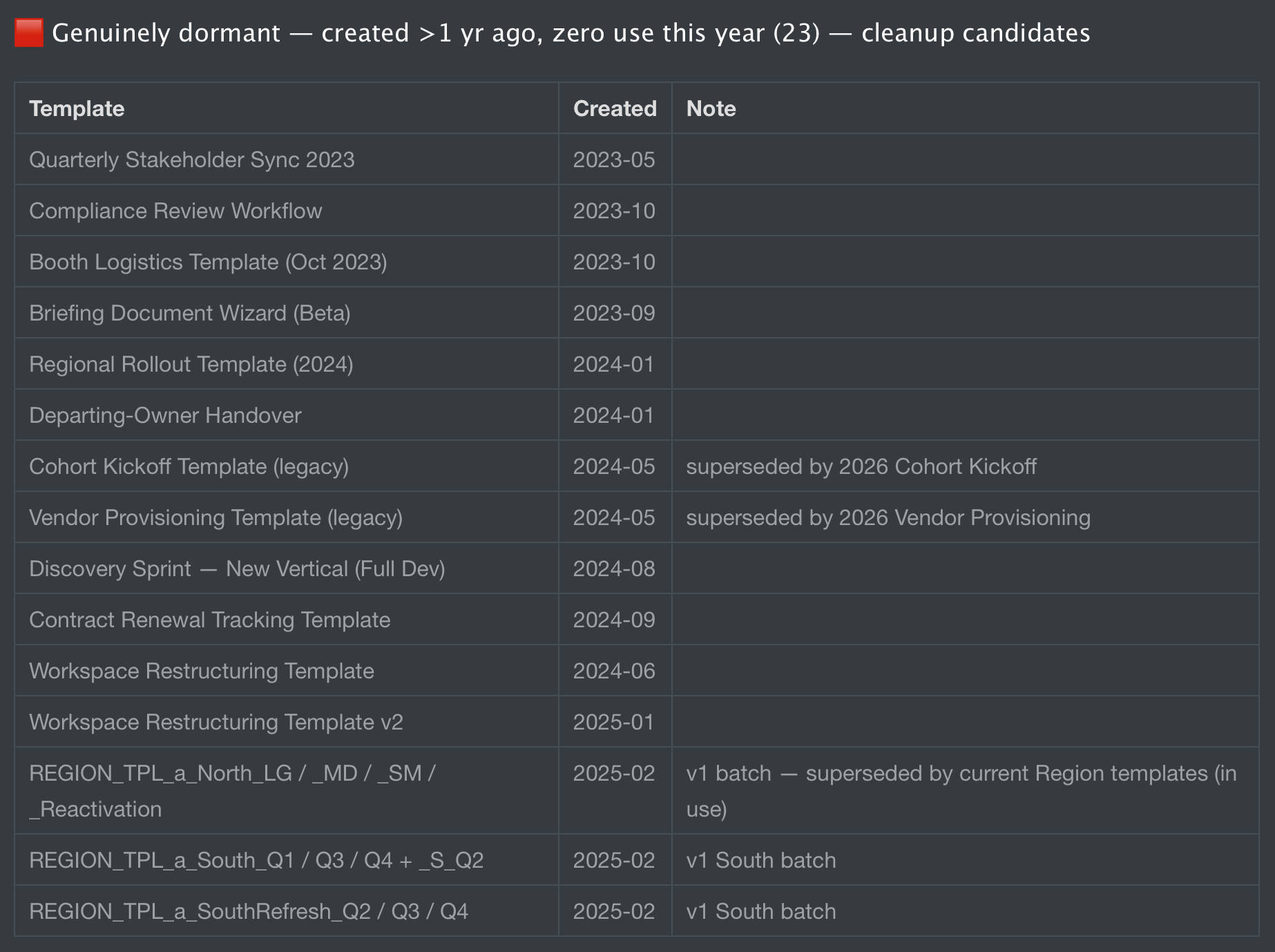
The whole run took about seven minutes. Most of that was pagination. Claude offered to either export the full breakdown as CSV or batch-deactivate the dormant cluster on confirmation.
Two things worth surfacing. The method transparency was unprompted: distinguishing lastUpdateDate from actual project-creation usage came from Claude on its own. That kind of “let me get the question right before I answer” is what you want a governance-tier agent to do. The pagination-and-diff approach was Claude's workaround for an MCP limit it ran into. The tool surface couldn't express the EXISTS filter directly, so it solved the problem the brute way. Both moves are operator-shaped.
Use case 2: portfolio narrative — leadership-ready in six minutes
The second use case is where the MCP and Claude's reasoning combine into something neither does alone.
Most quarterly portfolio updates take hours: pull the projects, check task status across each, identify what's stuck, write the narrative, format it for the audience. The PM who owns the portfolio knows this work intimately and also knows it's the work they'd most like to push off their plate.
I built a small fabricated portfolio: Q4 2026 Holiday Launch, four projects, mixed statuses. Then asked Claude:
“Pull my active portfolio Q4 2026 Holiday Launch and generate a leadership-ready quarterly narrative. For each project: name, status, owner, percent complete, last update date. Flag risks — overdue tasks, blocked approvals, projects with no updates in the last 14 days. Output a markdown document with: executive summary, mermaid diagram of the portfolio grouped by status with risk indicators, wins, risks with recommended action, where leadership input is needed. Save the markdown to /tmp/portfolio-narrative.md. Render any mermaid diagrams to PNG using the mermaid CLI. Convert the full markdown to PDF with pandoc. Open the PDF when done.”
Claude pulled the portfolio, the four projects, and the task-level detail it needed for risk flagging. Identified that the Q4 Email Series project was 100% complete but stuck in approval, Complete – pending approval status, around 50 days past its original target date. Flagged the earliest-stage project as a watch. Verified the toolchain (pandoc was present; mermaid CLI needed to be fetched via npx and a permission error needed working around). Wrote the markdown. Rendered the mermaid diagram. Caught its own HTML-entity rendering bug in the first render, edited the source, re-rendered, verified visually. Built the PDF embedding the corrected diagram. Opened it.
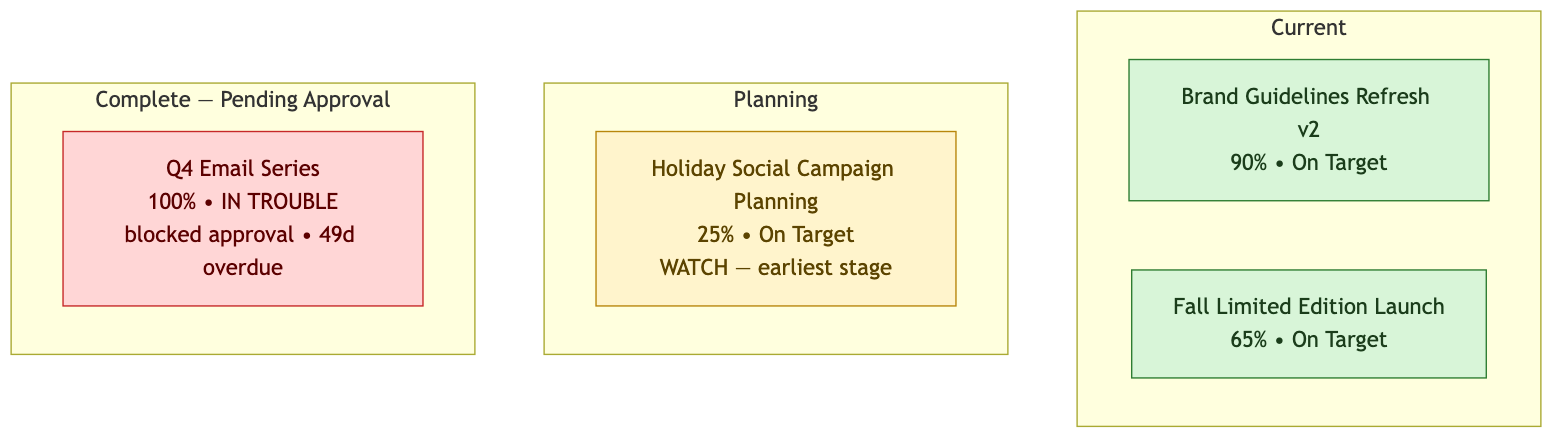
Plenty of tools can generate a quarterly portfolio report from extracted data. The thing to notice here is the full chain: live MCP data, reasoning over it, a mermaid diagram, a multi-step rendering pipeline, self-correction when a render came back wrong, and a polished PDF artifact at the end. The MCP made the data accessible. The agent's reasoning shaped the deliverable. Bash, pandoc, and mermaid CLI produced the artifact. Each individual piece is well-understood. Connecting them in one prompt-driven flow is the new thing.
Two operator-honest moments worth repeating from this run. Claude interpreted the CPL:A status code as “complete pending approval” from Workfront's convention rather than reading the approval-process record directly, and flagged the distinction. It also noted that “no projects with stale updates” was trivially true because the portfolio data was fresh. Both are the small honesty moments that build trust in an agent over time.
Some more things to try
The two walkthroughs are governance and leadership communication. The MCP supports a wider set of patterns. A few worth exploring.
Day-to-day operational queries.
“Find my overdue work across all my projects.” “Summarize the last 7 days of updates on project X.” “What approvals am I holding up?” Fast, useful, the kind of thing every Workfront user does in the UI ten times a day.
Cross-module reasoning.
“List my Planning workspaces. For the Campaigns workspace, show which campaigns have linked execution projects vs. which don't.” Planning ↔ execution linking is one of the wiring patterns most teams are still working through, and an MCP-shaped query against live data makes the visibility easier to build.
Architecture and design review.
“Review the custom forms on this project type. Any fields that overlap, contradict, or are unused?” “Look at this Planning workspace's record types. How could the taxonomy be improved?” Senior-consultant prompts. Claude won't replace the consultant. It can do a first pass against live structure faster than any human.
Cross-system orchestration (today, or soon).
“Take this content brief PDF and submit it as a request in the Marketing intake queue.” “Sync overdue Workfront tasks to my Jira board.” Some of these need other MCPs to exist (AEM, Jira). Those are coming, with varying timelines.
The prompts that work best are operator-shaped. Less “show me a chart of project counts,” more “review this and tell me what to fix.”
What this opens at the architecture level
Beyond individual prompts, the MCP enables five patterns that weren't reasonably available before. Worth thinking about even before you build them.
Standing agents that watch and act.
A PMO oversight bot that wakes up daily, pulls portfolio status, pings about anomalies. An approval shepherd that catches stuck approvals and drafts nudges. A governance audit agent that runs weekly against your policies and surfaces violations. These handle the connective tissue work humans hate.
Multi-MCP cross-system orchestration.
Workfront MCP alone is useful. Workfront plus Slack plus Jira plus Google Calendar plus AEM in one conversation is the bigger story. “Who's blocking what, where, and how do I unblock them?” answered across systems. Implementation work shifts toward composing existing MCPs rather than building bespoke integrations.
Brief-to-execution flows.
PDF brief, parsed, structured Workfront record, project scaffolding, asset routing, review chain. This is the content supply chain Adobe is investing heavily in across the GenStudio stack. Operators with MCP and an LLM can build their first slice of it today, customized to their org while the broader Adobe-side pieces continue to roll out.
Decision-support against live state.
“If I shift this project's end date three weeks, what downstream tasks are affected and who do I need to talk to?” “If I add Alex to this campaign team, where does the load go?” Counterfactuals against operational data. PMOs have wanted this forever.
Workfront as a source for other agents.
The unlock isn't always “Claude reads Workfront.” Often it's “every other agent reads Workfront.” A sales CRM bot pulls active campaign status to brief account teams. A customer-success agent retrieves project state to brief customers on delivery. An internal-comms agent pulls portfolio results to draft an all-hands update. Workfront takes on a system-of-record role for the agentic stack, with other agents consuming from it.
What's still missing
To be fair to the audience that has to build against this today:
- US region and AWS only. If your Workfront instance is in another region, you don't have access yet.
- Write actions are disabled by default. Your Workfront admin has to enable them, and they should (read-only is the right safety default), but it's a step every org has to take.
- Comments and Boards are on the roadmap.
- Advanced filter syntax (EXISTS modifiers) isn't currently passable through the tool surface. Claude works around it with brute pagination, at a cost in time.
- This is the user-attribution model, with all that implies. If your governance is loose today, this surfaces it.
These are the boundary to plan around. None are blockers for getting started.
What this changes for practitioners
The Workfront practitioner role is moving. The shape now leans more toward “stack architect who composes agentic flows across systems.” MCP makes the composition possible. The work moves up the stack.
For teams adopting this today: start with operator-shaped use cases. The governance audits, the portfolio narratives, the day-to-day finder queries. Build trust in the tool before you build agents that take action on its behalf. The cleanup-and-narrative tier is the right entry point because the outputs are verifiable against your existing reports. Once you trust the tool there, you're ready to consider the standing-agent and cross-system patterns.
The two walkthroughs above took about thirteen minutes of execution time between them. Both produced artifacts a human PM or admin could put in front of leadership the same day. They were Tuesday work, done faster, with the method visible.
That's the shift.
References
Adobe Workfront MCP server (Adobe Experience League):
Model Context Protocol:
Other Workfront MCP coverage:
- Vinay S., “How Adobe Workfront MCP Server is Transforming Work Management”
- Nino Skuflic, “Beyond Work Management: How MCP Will Transform Adobe Workfront”
- Zapier MCP for Adobe Workfront (third-party MCP server)