From the Field / Principles
Who's Your Agent?
Choosing between the Workfront API, MCP, Fusion and AI Collaborators
Written by David Kershaw — Tekmera Founder
Adobe has been releasing a lot of AI capabilities lately, and the question I keep hearing is where each one fits. When do you use the Workfront API, when do you use MCP, and when do you use Fusion? AI Collaborators add another option, and now Fusion itself has AI modules.
Several of these tools can touch the same Workfront data, and choosing one means choosing what you'll run and maintain afterward.
The usual advice is to start with the use case and pick the best fit. I agree, but if four use cases lead to four different platforms, you've also given yourself four footprints. So before I compare features, I go a layer above the question. What are we trying to accomplish, what are we willing to own, and what have we already decided to run? Once those are clear, the tool choice gets easier.
Where the work happens gives you the platform answer. If the work happens in Adobe, work within what Adobe provides. If it happens in Microsoft, work within Microsoft.
You could go fully custom and integrate across every platform yourself, but that's the footprint problem again, at a much larger scale. My bias is toward the platform's products over building your own. If the work really does span several platforms, that's where n8n or another general platform fits.
If the work is in Adobe and the steps are known, that's a standard Fusion scenario or the API, with no AI at run time. If a person wants their own assistant working in Workfront, that's Workfront MCP on their own account. If an agent should take on work inside a Workfront project, that's an AI Collaborator. Before building anything custom, work out whose identity Workfront will see, because that's where the real decision is. The version that looks most like the ask, one assistant for everyone on a shared integration account, is the one I'd avoid.
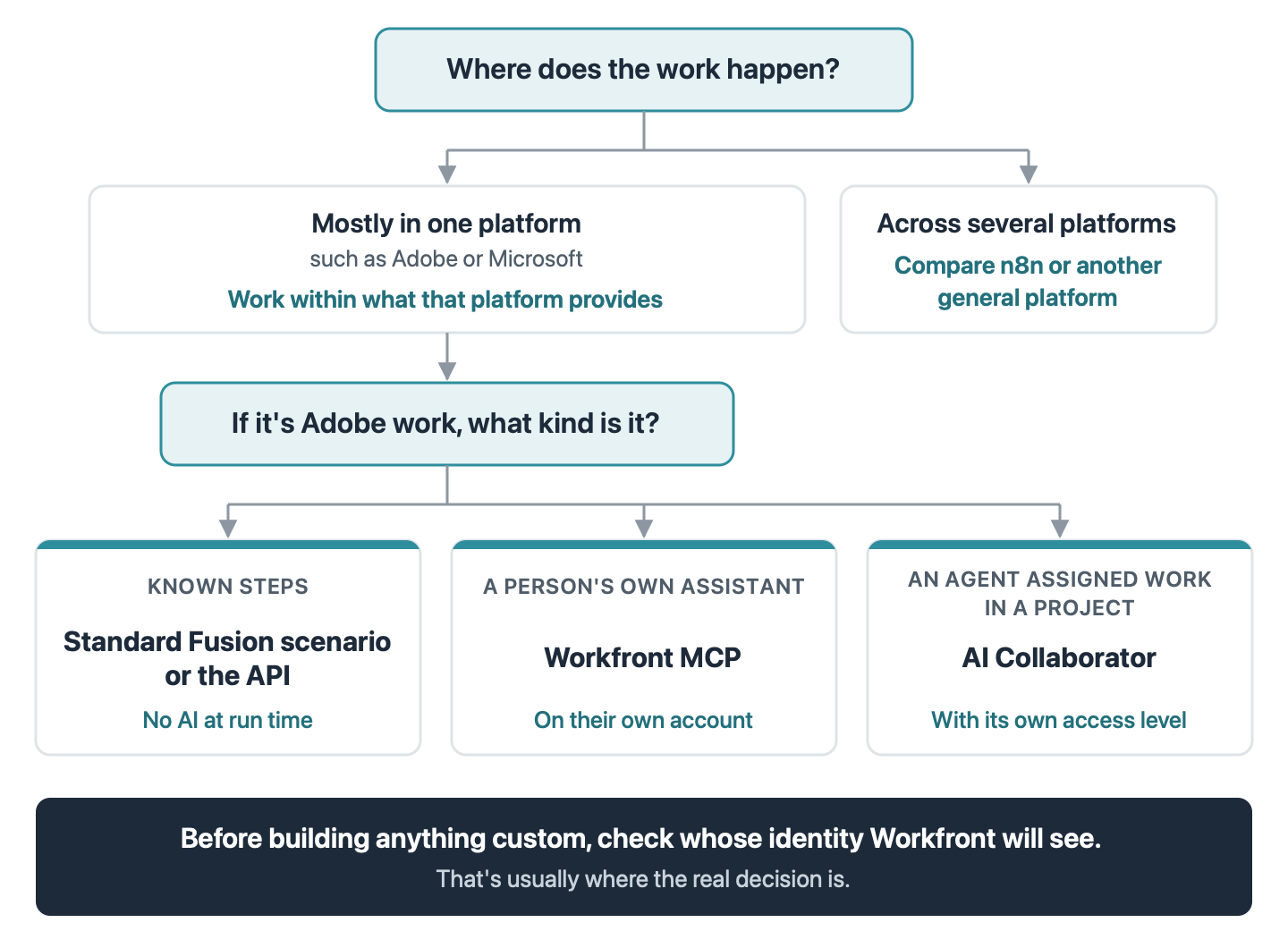
The layer above
AI covers a lot of ground, so I start with what the work needs. A lot of work is deterministic. The steps are known, and part of the value is that it runs the same way every time. That kind of work doesn't need AI at run time. The Workfront API handled it before this wave of AI, and it still does.
There's also a build versus buy question that gets skipped. Most organizations aren't AI companies, even when AI is a big part of their plans. If AI isn't the business you're in, building and maintaining your own version of a capability that a platform is rapidly adding deserves a higher bar. An organization that builds its own has paid for the build, and most of the cost of maintaining it is still ahead of it.
At some point you're placing a bet. When the landscape is unsettled, the old “nobody gets fired for choosing Microsoft” instinct is the right one. You choose something you can operate, accept its limits, and resist adding another system every time a new term arrives.
And the terms do arrive quickly. MCP was the new thing, then agent-to-agent, and now agent factories. Some of that is new capability, and some of it is a new name for something that already existed. If every announcement changes the plan for a deployment, it's hard to finish anything. Teams don't need their architecture at the bleeding edge to make good decisions.
Identities, always identities
Identity is fundamental to this decision, and in a lot of cases it is the decision. It's also easy to overlook. It's easy to treat it as a gate on the way to getting something running. You find a credential, get access approved, and move on, and it never gets designed as a requirement of its own.
Who asked for the work, and whose credentials does Workfront actually see? Those are often different. Someone asks an assistant a question, and the assistant reaches Workfront through an integration account. The answer looks like it was retrieved for that person, but Workfront only sees the account, and the account's permissions decide what comes back. That gap is easy to create by accident, so design and approve it on purpose.
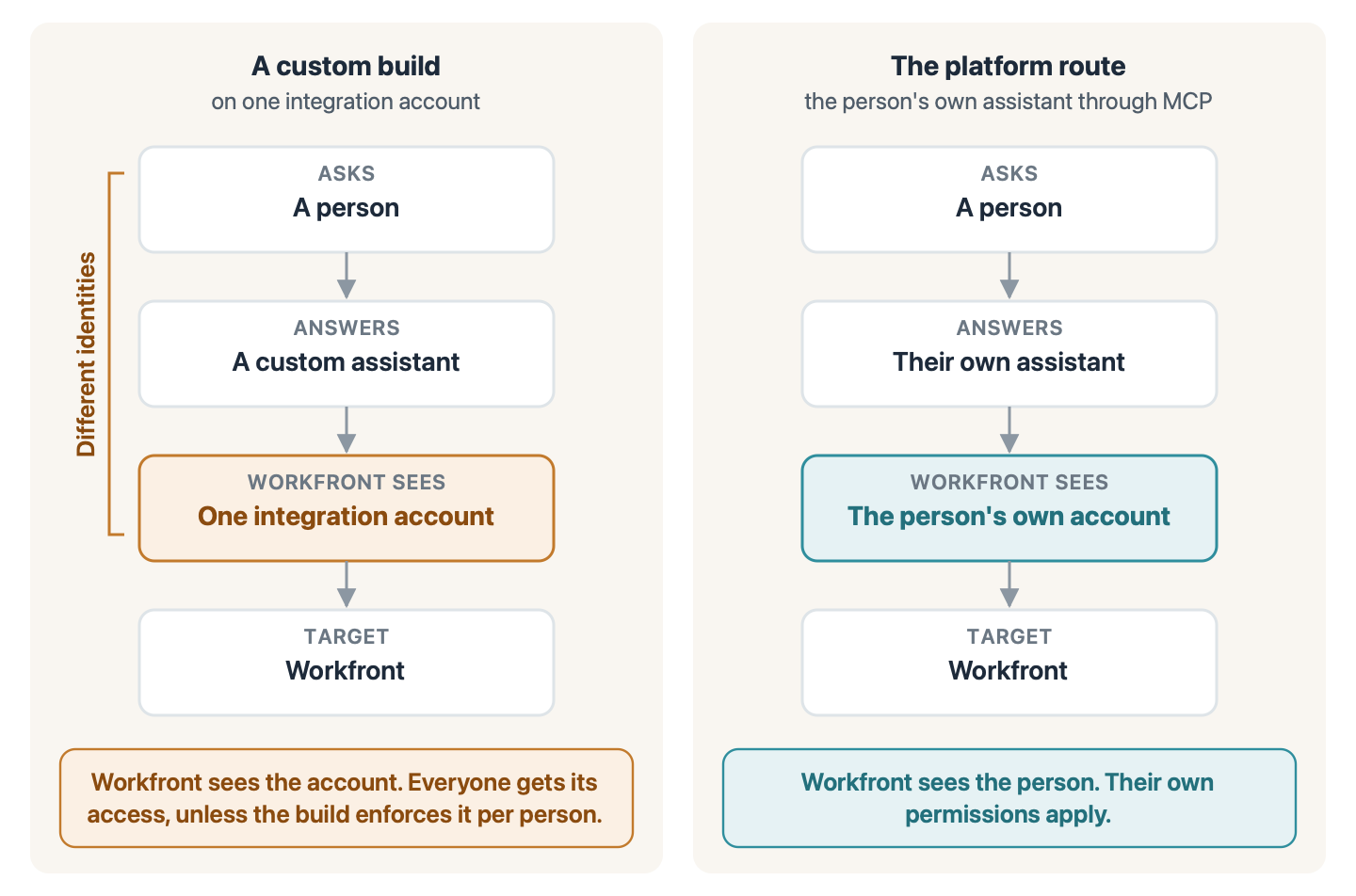
This is also where the build versus buy question comes back. The platform's own options can carry the identity for you. Workfront MCP, connected through a person's own sign-in, acts as that person, and an AI Collaborator gets an access level the way a user does. A custom build has to bring its own identity to reach the platform, usually an integration account, and that's where the gap between the person asking and the credential Workfront sees starts.
The platform route still needs checking. Workfront MCP can also be called with a service credential, and a Fusion scenario runs on whatever connection someone set up.
How identity breaks
I want to know how that identity breaks, too. What can the credential read or change, and is that limit enforced by the target system? Can we trace an action back to the person who asked for it? What happens if an agent can use a connection with more access than the task requires? These are ordinary enterprise software questions, and they're easy to miss when the conversation starts with what the agent can do.
A single pane of glass
Then there's the question of a single pane of glass for agents. Products for it exist now, and what they're for is governance: knowing which agents you have and keeping them in check. The question is where that governance belongs.
We don't keep a live view of everything employees do. We give them an account with the access their job needs, a manager who knows their work, and audit logs to check when something goes wrong.
An agent that works on its own can be governed the same way, at the identity layer you already run. It gets its own account, separate from any person's and from shared integration accounts, with the least access the job needs and an owner. A person's own assistant is different, because it acts on that person's behalf and Workfront sees the person.
Either way, the inventory belongs in the identity layer: which agents exist, who owns them, and what they can reach. Each business area then sees its agents' work in the platforms where it happens, the way a collaborator shows up in its Workfront project.
Watching across all of it, reviewing permissions and flagging unusual activity, is already a product category in identity and security, and those tools are extending to agents. The rule is the same as everywhere else in this piece: use the version your identity or security platform provides instead of building your own.
Agents do differ from people in a few ways. They act much faster, so a bad permission does damage sooner. They can be left running after the person who built them has moved on. And a prompt can push them into something their owner never intended. Access and ownership come first, because good permissions limit the damage. They don't tell you when an agent is doing the wrong thing inside those permissions, though, and an agent that acts quickly needs that signal quickly. That's where the monitoring from your identity or security platform earns its place.
One ask, all the way through
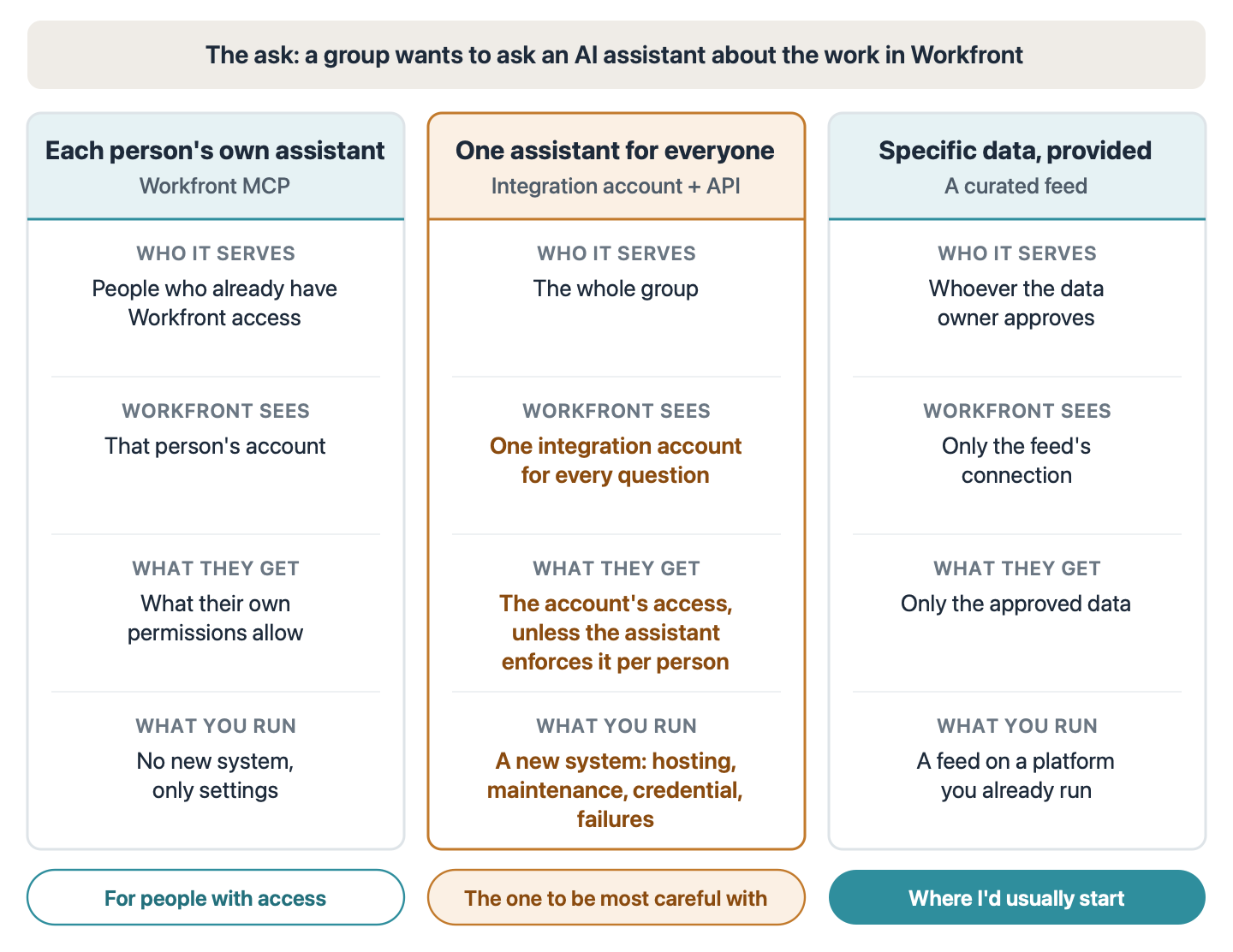
Here's an ask I hear in different forms. A group of people want to ask an AI assistant about the work in Workfront: what's late, what's at risk, what changed this week. Some of them live in Workfront every day. Others rarely log in, and a few don't have their own access.
At the tool level, this looks easy. It's a person asking questions and following up on the answers, which is exactly what an assistant is good at. There are a few ways to build it, and they all work in a demo.
Their own assistant
The first is for each person to connect their own assistant through Workfront MCP. Workfront then sees that person's account, and they get what their own permissions allow. Any action in Workfront is recorded against that account, and the option adds no new system to run, only settings to manage. The catch is that it only serves the people who already have Workfront access and are comfortable with an AI assistant, and they may not be the people the ask came from.
One assistant for everyone
The second is to build an assistant that everyone can use, backed by a single integration account calling the API. It serves the whole group, and it's the closest match to the ask.
At the layer above, it looks different. Workfront sees one account for every question, so unless the assistant enforces each person's own access itself, everyone gets that account's access, including people whose own access would show them far less, or nothing. Tracing a question back to a person means relying on the assistant's logs instead of Workfront's.
Building that enforcement is real work, and it's part of a custom build that becomes a new system to run. Someone owns its hosting, its maintenance, its credential, and its failures for as long as it runs.
Specific data, provided
The third is narrower. Work out what the group needs to see, and provide that specific data to the assistant instead of giving it broad access to Workfront. It's less impressive in a demo, but the access is bounded by design, the data owner decides what leaves the system, and when it breaks, the owner is clear.
It has costs, too. Bounding the data doesn't settle who may receive it. Some of the group have no Workfront access, so the data owner still has to approve sharing it with them, even through a curated feed. That approval is the identity question again, moved to a different point.
The assistant can also only answer questions inside that data. Someone has to keep it current, usually with a feed on a platform you already run, and a follow-up question that falls outside it gets no answer. That turns scope into a conversation with the data owner, which is where it belongs.
Where I'd start
Each of them answers the ask for at least part of the group. What separates them is the caller, the credential, what that credential can reach, and who answers for it when something goes wrong. In a case like this, I start with the third and let people who already have access use MCP on their own accounts. I'd avoid the second, even though it looks most like the ask.
Placing the other tools
Simpler asks are easier to place. Say an approved Workfront project needs to create a record in another system. The trigger and fields are known. That's a standard Fusion scenario if the connectors and operating model fit, or a direct API integration if it belongs inside an application. A model choosing the steps at run time adds nothing there.
The person in the first option above is who I've had in mind when I've called MCP a power user tool. I use the Workfront MCP server when I'm building on top of Workfront, but I'm not a Workfront user in the everyday sense. Two runs of that kind are written up in What the Workfront MCP Actually Unlocks. The person who gets the most out of it is the AI-native admin who lives in Workfront and wants their assistant to reach into it. Ali Spittel captured the preference well: “i really don't want to use your agent, i want to use my agent to use your thing.”

That preference doesn't rule out AI Collaborators. If an agent is assigned a review or a task as part of a Workfront project, the work belongs in the project. A person's assistant reaching into Workfront and an agent receiving a Workfront assignment can both make sense, even in the same organization.
Collaborators also make the identity question concrete. Each one gets its own access level in Workfront, assigned the way you'd assign a user. An external agent, such as one built in Copilot Studio, also runs on its own platform's credentials, so it has a second identity outside Workfront with whatever access that platform gives it.
Fusion also has its own MCP server, and it's for work on Fusion itself. The main uses I see so far are documenting scenarios automatically, a build agent that helps put scenarios together, and a monitoring agent that watches executions. In those cases Fusion is the data the agent works with, instead of the iPaaS running the work.
A scenario can call MCP itself through the Workfront MCP or MCP Agent module, both in beta, and like any other module it runs on the connection configured for it.
The pattern I'd reach for first in a scenario is narrower, and I've used it for things like triaging phone calls. A model classifies unstructured text into a category, and the scenario routes on the result with standard modules.
If I need an automation footprint for Adobe work, Fusion is where I start. Its Workfront and Adobe connections are a strength.
But if the mandate is to integrate work across the whole company, I wouldn't assume Fusion should run it all just because it can connect. No one's buying the Adobe stack because Fusion exists. That's where I'd compare n8n or another general platform, and I'd be deliberate if both end up running. I don't want two systems quietly writing to the same system of record with no clear owner.
A reference
This covers what happens at run time. Whether AI helps you build the integration is a separate question. Treat each row as a starting place, then work through the identity and ownership questions above before settling on it.
| The work looks like | Usually starts with | Who or what acts | Watch for |
|---|---|---|---|
| Known steps between systems, on a trigger or schedule | A standard Fusion scenario | The scenario's connections | Who owns failures and retries |
| Known steps that belong inside an application | The Workfront API | Depends on the integration's design | Maintenance cost of a custom build |
| A person exploring Workfront with their own assistant | Workfront MCP | The person's own Workfront account | What the assistant is allowed to change |
| An agent given a task or review inside a Workfront project | An AI Collaborator | The collaborator's own Workfront access level; an external agent also runs on its own platform's credentials | What an external agent can reach outside Workfront |
| Documenting, building or monitoring Fusion scenarios | Fusion MCP | The person's Fusion access | Write access to production scenarios |
| Integration work that spans the company's platforms | n8n or another general platform | That platform's connections | One clear owner for writes to each system of record |
| Text that needs classifying before routing | A Fusion scenario with a model step that picks a category | The scenario's connections | Keeping the category list fixed |
The table won't produce the answer by itself, and the example above is why. Every option there would have matched a row. The choice came from the caller, the credential, and who owns it, which is the layer above the original question. A team has to work those out before the tool question has an answer.
References
Adobe Experience League
- Adobe Workfront MCP server overview
- Use the Adobe Workfront MCP server
- Configure the Adobe Workfront MCP server
- Configure AI Collaborators
- Configure the Adobe Workfront Fusion MCP server
- Adobe Workfront MCP modules in Fusion
- Add an AI prompt to your scenario
- Adobe Workfront integration methods
- Fusion connection overview
From practitioners
- Becky Barus, AI Collaborators in Workfront: Your new teammates
- Ali Spittel, post on X, August 21, 2026
On agent identity